
For enterprise B2B websites, Core Web Vitals aren’t a nice-to-have SEO metric. They’re a signal of whether your platform can keep up with modern complexity, from CRM-connected experiences, personalisation, and gated content, to analytics, consent, scripts, and global governance.
In other words, Core Web Vitals are often the first place performance debt shows up. That’s long before a redesign or migration is even on the roadmap. Even Google’s own documentation states that Core Web Vitals are used as part of its Search’s page experience systems, but they’re not the only thing that matters.
Content relevance still wins.
What are Core Web Vitals?
Core Web Vitals are made up of three UX metrics:
-
Largest Contentful Paint (LCP): How quickly the main content loads
-
Interaction to Next Paint (INP): How responsive the page is to user input (INP replaced FID in Core Web Vitals in 2024)
-
Cumulative Layout Shift (LCS): How stable the page layout is as it loads
Google also defines performance thresholds for these metrics to define what ‘good’ looks like.
A typical example of a page that performs poorly in all of these aspects would go something like this:
- You click into a new article you want to read
- It takes 10 seconds for the article’s content to load
- You try to click a link in the content, but the page suddenly shifts, and you accidentally click on a banner ad
- The banner ad takes several seconds to respond, leaving you waiting before you can go back to the link you intended to click in the first place
In short, Core Web Vitals simulate the user experience.
How to test Core Web Vitals
You can test any page in Google’s PageSpeed Insights tool. What actually matters is understanding the difference between:
-
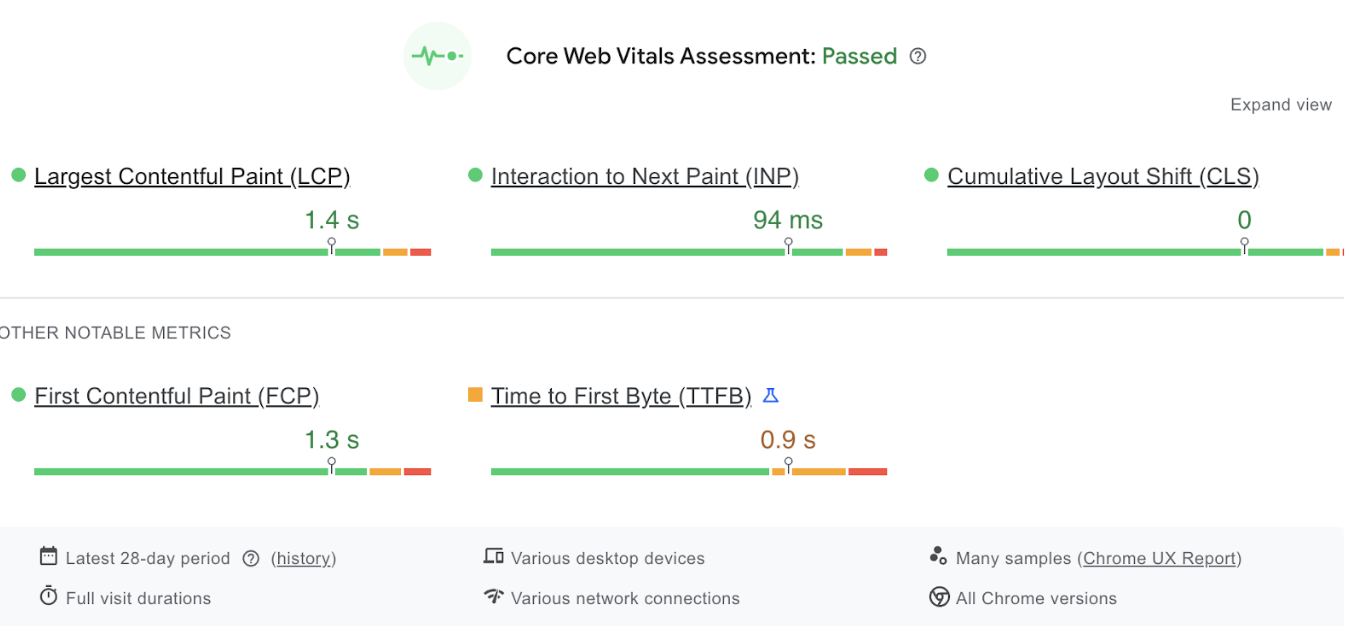
Field data (real users): Aggregated UX over a rolling window. PageSpeed Insights uses Chrome UX Report data over the previous 28 days when enough data exists
-
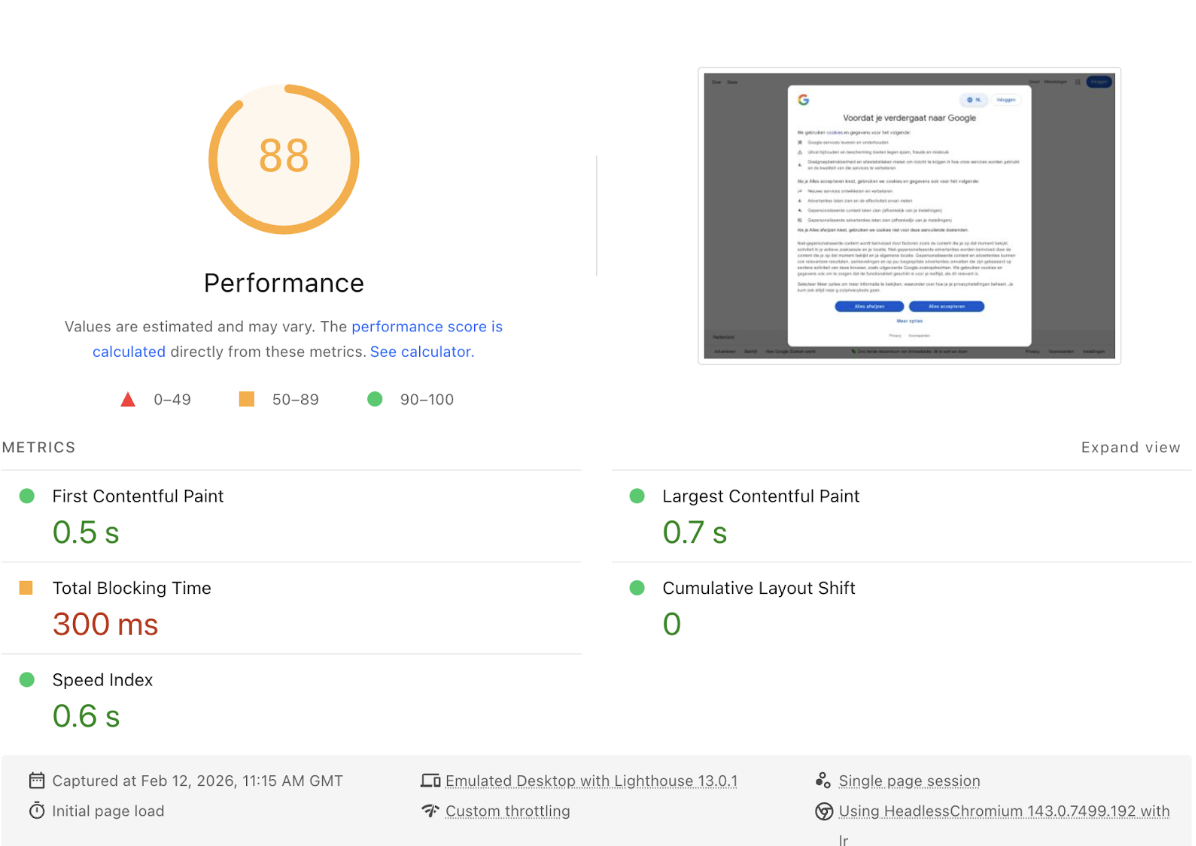
Lab data (simulated): A single test run that’s useful for debugging, but not the real world
For enterprise websites, you need both field data to understand real performance at scale and lab data to understand what’s driving the problem, such as scripts, images, render-blocking, and resource issues.
To begin testing, you can drop a page URL into Google’s https://pagespeed.web.dev/ service for analysis. At the top of the page, you’ll see your Core Web Vitals Assessment, based on real, recorded data from the past 28 days.
 Below this, you’ll see your performance score. This isn’t based on real user data but on a simulated snapshot of the user experience. It isn’t as accurate as the Vital scores and you’ll likely get a different score each time you run an analysis, but it can be a useful way to quickly test the impact of attempted improvements.
Do Core Web Vitals affect rankings for B2B websites?
Core Web Vitals can influence rankings as part of the page experience, but Google advises against focusing on only one or two aspects of page experience. It’s only one component of how Google evaluates quality, alongside things like usefulness and relevance.
Think of it like this:
- Core Web Vitals won't make irrelevant content outrank relevant content
- But poor performance creates friction through lower engagement, weaker conversion, more dropoff, etc., which impacts commercial outcomes and not just SEO
Why Core Web Vitals matter more in enterprise environments
If your website is small, simple, and brochure-like, then passing Core Web Vitals is typically a matter of optimisation. But if your website is a key part of your organisation’s wider revenue system, then performance is a platform concern:
- CRM-connected forms and routing
- Multiple markets, languages, governance, and teams
- Personalised content and segmentation
- Gated content and portals
- Consent and analytics tooling
For enterprises, performance tends to degrade because too many things are bolted on over time, not because one thing is wrong.
Performance issues in complex stacks
This is the part most teams miss. Performance issues arise when you keep adding capabilities without upgrading the foundation of your website. It can usually look like this:
Plugin and script crawl
Every tracker, tag, chatbot, A/B testing tool, and embedded widget — all of this and more adds weight and often adds work on the main thread, which can worsen responsiveness. It’s rarely one tool that breaks performance; it’s the cumulative effect.
Quick fixes that become permanent fixtures
A landing page here. A microsite there. A temporary third-party form that you forget to remove. Over time, you end up with a website that can’t be optimised cleanly because the architecture is inconsistent.
Ownership gaps
Enterprises usually fail to perform because nobody owns it end-to-end. Marketing owns content, IT owns the infrastructure, analytics owns tags, product teams add scripts, and agencies add plugins. Performance issues grow between all of these gaps.
Governance that doesn’t include performance
You might have content governance and brand governance, but might still see performance dipping every week because you don’t have any standards for script approvals, tag management rules, image and video standards, component reuse, and more.
What you need to prioritise
Some platforms create more operational overhead through maintenance, plugin compatibility, and security patching. While others reduce the number of moving parts, which can help your website’s performance stay stable over time.
Can you sustain performance if your business keeps adding requirements? That’s why you should treat Core Web Vitals as a performance infrastructure and not just an SEO garnish.
In terms of improving the score without any context, the priority is context-dependent. If your website regularly scores in the red or users consistently report frustration when using it, you need to make your Vitals score a top priority.
But if you remove a background animation from the homepage, for example, and it bumps performance from 93 to 97, you might want to consider whether it’s a worthwhile switch, as both are great scores and well within the pass parameters.
So, instead of chasing scores, you should focus on predictable gains instead:
- Compress your images and resize them if they’re excessively large
- Convert images to PNG or WebP format
- Convert videos to MP4 format for the best web performance
- Third-party tools have a big impact on loading times, so re-evaluate your integrations and remove anything that isn’t bringing value
- Limit custom fonts, as each font file adds to the overall load time
- Be selective with pop-ups, slide-ins, and chatbots. These require additional scripts and contribute to Cumulative Layout Shift
If your website is CRM-connected, multi-team, and is constantly evolving, then Core Web Vitals are less about SEO best practices and more about whether your platform is built to scale without slowing your business down.
Frequently asked Core Web Vitals questions

Are Core Web Vitals important for B2B websites?
If your B2B site supports conversion and pipeline, then yes. They’re used to spot friction in the user experience and are a signal used in Google Search’s page experience systems.
What’s the fastest way to check Core Web Vitals?
Use PageSpeed Insights and prioritise field data (real users). It’s based on Chrome UX Report data, when available, over a rolling 28-day period.
Should we optimise for a perfect score?
No. Aim to pass thresholds consistently and focus on reducing friction and preventing regressions through governance and architecture. Google itself advises against focusing on only one or two aspects of page experience.
_88078632.png)


.jpg?width=375&height=225&name=_DSC2023%20(1).jpg)